How to visualize and export y and b ions from M+1 and M+2 precursors

support
How to visualize and export y and b ions from M+1 and M+2 precursors erints  2026-03-16 15:44
 

Hello,

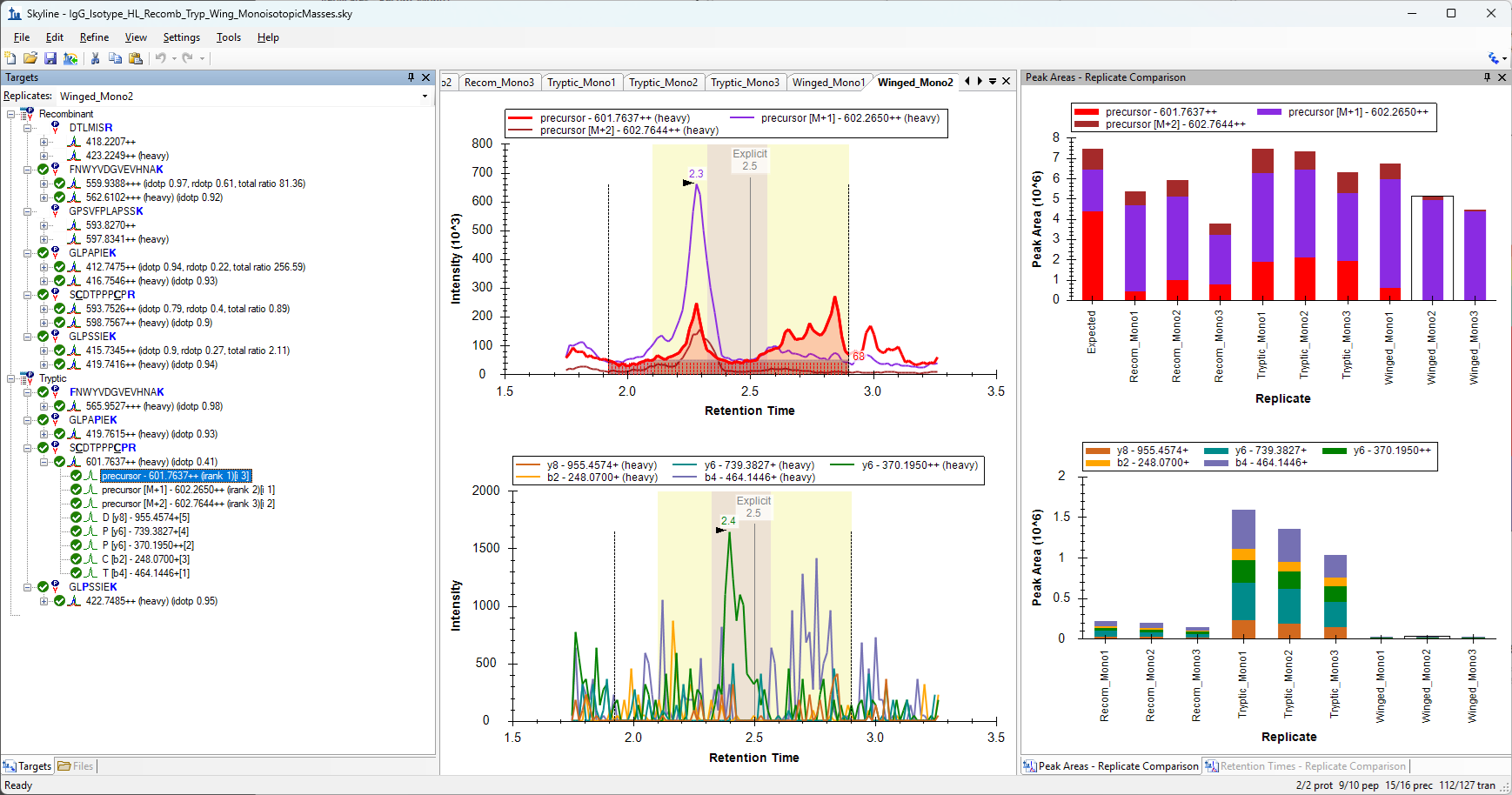
We are looking to resolve some interference we're having between several heavy-labeled internal standard types we are interested in comparing. We are looking at IgG isotype peptides and only have this interference occurring with our IgG3 peptide. One way we are looking at resolving this, is by looking at the M+1 or M+2 precursor for select standards instead of the monoisotopic precursor to increase the distance between the masses, especially since the tryptic IgG3 standard has higher signal for the M+1 over monoisotopic. We have already compared the monoisotopic vs average, but this didn't resolve the issue for our specific isotype of interest. Is there a way where we can change a setting in Skyline or use a reporting feature so we can isolate what the product m/z is for the M+1 and M+2 precursors for a specific peptide? I can see the M, M+1 and M+2 m/z precursors in the pulldown, but the monoisotopic precursor is what is used to visualize/quantitate the respective product's m/z. I tried only checking the M+1 and reimporting, thinking that Skyline would recalculate the m/z for the products just for the M+1 precursor, but it continues to give products for the monoisotopic precursor only. We are looking at how to find these values in prospector, but it would be great if there was already a feature in Skyline that would display products for a specific precursor, especially since those precursor values are already known. We are currently using Skyline 26.1. Here is a screenshot of the precursor I am interested in, in a word document. Attached is the skyline file as well.

Thank you!
Erin


Nick Shulman responded:  2026-03-16 16:13
Title: How to look at product m/z for M+1 and M+2 precursors
I do not understand your question.

One thing which I do see in your data is that Skyline seems to be reporting near zero area for the M+0 precursor even though I can clearly see a rather significant area under the chromatogram curve.
In the attached screenshot, for the selected replicate, there should be a significant amount of red on the peak area bar graph, but, there it's really not visible.
Is that what you are asking about? That looks like it might be a bug in Skyline. I could certainly try to figure out why Skyline is doing this.

Are you asking how to exclude the M+0 peak from quantitative calculations? You can right-click on that precursor in the Targets tree and uncheck the "Quantitative" menu item.

I'm not sure I understand what the word "products" means as you are using it. Are you asking about monitoring something other than the monoisotopic fragment ions? There is a bit of a discussion about that here:
https://skyline.ms/announcements/home/support/thread.view?rowId=68449

Can you clarify your question?
-- Nick
 
erints responded:  2026-03-17 09:25
Hello Nick,

We are trying to see what the transition y and b ions are for our M+1 and M+2 precursors. Currently we only see the transition y & b ions for our M+0 precursor, and don't know how to change that. We essentially see more signal in some of our M+1 heavy labeled peptides, so we want to export a transition list to run a MRM method on the transitions specifically for our M+1 instead of M+0. However, Skyline defaults to showing the y/b ions for the M+0 (shown in attached picture) even if we toggle off and only show the other isotopes and reimport, giving us no way to see and export those ions. For example, M+0 precursor is 601.7637++ m/z and M+1 precursor is 602.265++ m/z, but all of the y/b ions are under the 601.7637++ m/z in the attached image, and we want to see the y/b ions under the 602.265++m/z. I figured since Skyline knows what the M+1 and M+2 isotopic precursor masses are already, there must be a way to see what their respective y/b ions are as well?

Thank you,
Erin
 
Nick Shulman responded:  2026-03-17 11:31
I would recommend that you go to the "Modifications" tab at "Settings > Peptide Settings" and define an isotope modification which has a mass of one Dalton.
Then, in the Targets tree, use the "Edit > Modify Peptide" to apply that modification to one of the residues in the peptide sequence.
This will result in the precursor mass being one Dalton heavier. In this way, Skyline will be looking for SRM chromatograms with a Q1 value which is one Dalton heavier than the unmodified precursor mass.
You can decide which amino acid residue to apply the modification to depending on whether you want your fragment ions to also be one Dalton heavier. If you want the y ions to be one Dalton heavier then you would apply the one Dalton modification to a residue at the end of the peptide sequence, and if you did not want the fragment ion to be heavier you would apply the modification to the other end of the sequence.
If you wanted to be able to monitor both the monoisotopic fragment and the M+1 fragment, then you would also need to define some neutral losses with masses +1 Dalton and -1 Dalton so that you can get the fragment ions with the masses you want.

I see that you were trying to tell Skyline to look at more isotopes using the "Isotope Peaks Included" setting on the "Full Scan" tab at "Settings > Transition Settings".
Unfortunately, that setting only does something when Skyline is extracting chromatograms from MS1 spectra. It is not intended to be used with SRM chromatogram data.

Note that if your instrument method only actually acquired data for the M+1 precursor, and you don't need distinguish chromatograms with Q1=M and Q1=M+1, then the simpler thing to do is to leave your Targets the way that they are and go to the "Instrument" tab at "Settings > Transition Settings" and change "Method match tolerance m/z" to 0.6 which is the highest number it can be. Since your precursors are charge 2, a method match tolerance m/z of 0.6 would be enough so that Skyline would be willing to use Q1=M+1 chromatograms. But, this would only work if the .raw file did not also contain Q1=M chromatograms that Skyline would use instead.

Here is a great webinar for learning about modifications in Skyline which might help with the trickiness of applying that 1 Dalton heavy modification to your peptides:
https://skyline.ms/project/home/software/Skyline/events/2015%20Webinars/Webinar%2010/begin.view
-- Nick