Why my Skyline stopped working?

support
Why my Skyline stopped working? zhaoty  2025-12-17 18:20
 

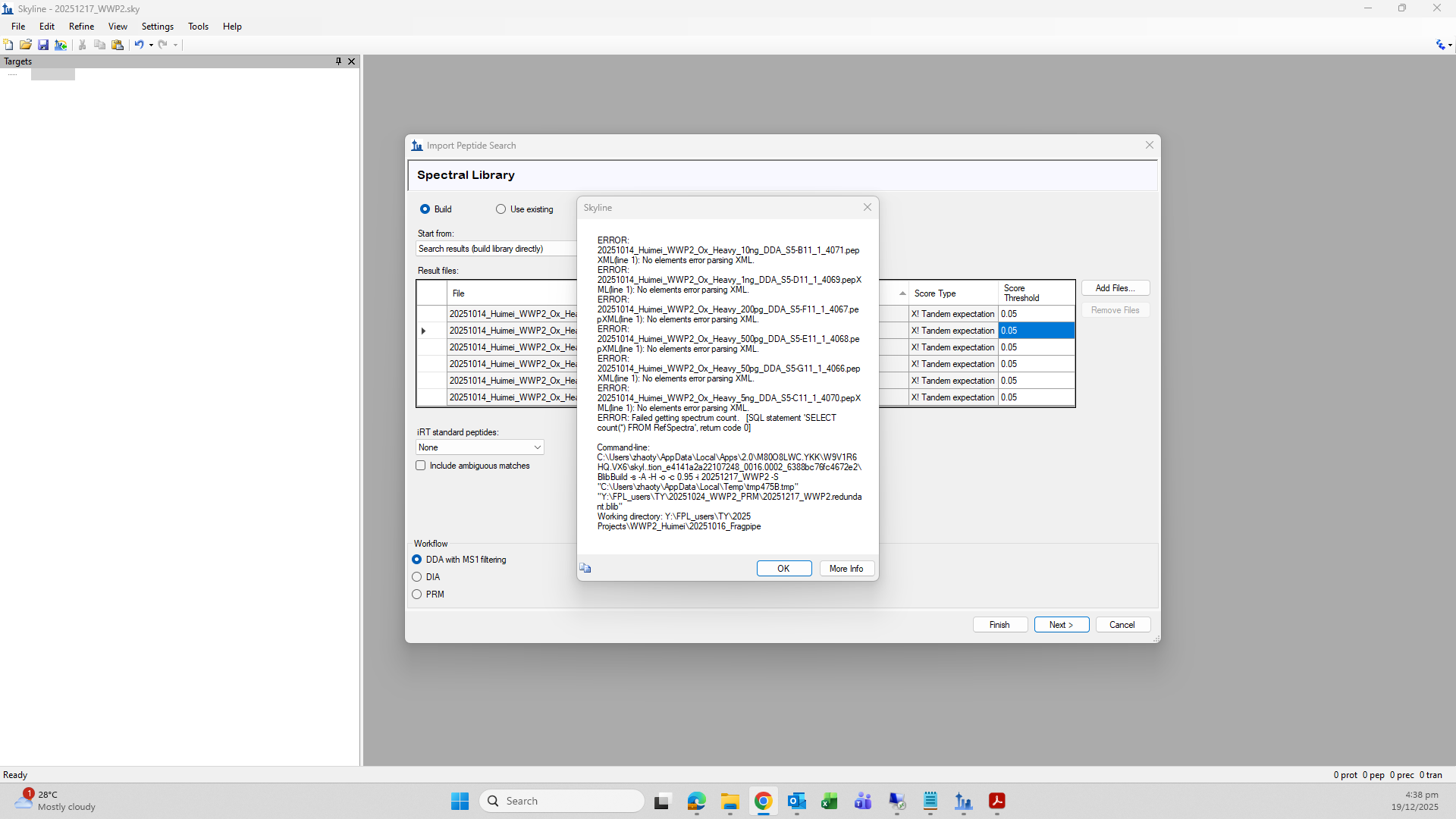
I am using Skyline for proteomics analysis and am encountering an issue with a previously created document.When I attempted to reopen a Skyline document that I created approximately two months ago, the file failed to open. I then tried to recreate a new Skyline document by repeating the same workflow; however, I encountered an error during the peptide results import step.To minimize compatibility issues, I do not update Skyline frequently. I am currently using Skyline version 22.2.0.351 on Windows 11 Pro.I would like to ask whether there are any troubleshooting steps or alternative solutions to resolve this issue without reinstalling or upgrading to a newer version of Skyline.


Nick Shulman responded:  2025-12-17 19:16
If you hover the mouse over the red exclamation marks in your screenshot, a tooltip should appear which will tell you what the problem is.

By the way, you can run many different versions of Skyline on the same computer at the same time.
One way to do that is to go to the "Unplugged" installer page:
https://skyline.ms/home/software/Skyline/wiki-page.view?name=install-64-disconnected

After you click "I agree", a link that says "archive" will appear. When you click the "archive" link, the complete list of past Skyline versions will appear.
Each item in that list is a .zip file that you can download.
When you unzip the file, you can either run the "setup" file that is in there, or you could navigate to a subfolder and find the program "Skyline.exe" to launch.

Note that if you use Windows to unzip the file you have to first right-click on the .zip file and choose "Properties" and check the checkbox that says "unblock".
But, if you use another program such as 7-zip to unzip the file then unblocking is not necessary.

-- Nick
 
zhaoty responded:  2025-12-19 00:46
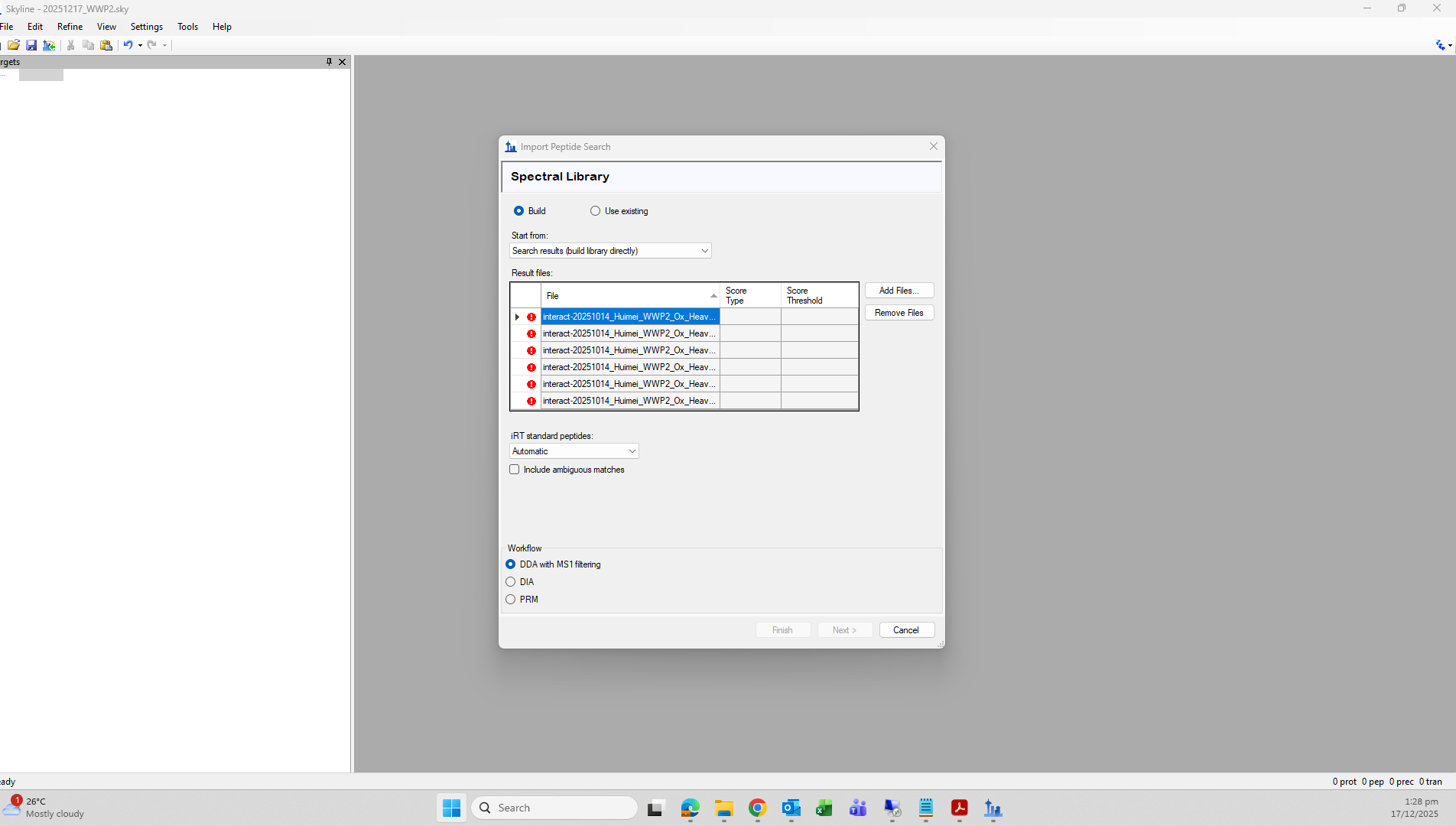
Thank you for the guidance. I finally input all my dda results and tried to build a library from them but then I got an error mentioned that "No elements error parsing XML". Does it mean that no information can extracted from the dda result files? I used them about 2 months ago and they were fine at that time.
 
Nick Shulman responded:  2025-12-19 07:55
Can you send me the file that is mentioned in that error message "20251014_Huimei_WWP2_Ox_Heavy_10ng_DDA_S5-B11_1_4071.pepXML?

I believe the error that you are seeing "No elements error parsing XML" is what you get when the pepXML file is empty. If that file really is an empty file then it would mean that something went very wrong when you did your peptide search.
-- Nick
 
zhaoty responded:  2026-01-14 00:29
Hello, Nick. I have uploaded my file here. Please help me to check if something went wrong. Thank you!
 
Nick Shulman responded:  2026-01-14 07:20
I think I need to see all of your files in order to figure out what is going wrong.
Can you send me all of the files from the "Y:\FPL_Users\TY\2025 Orijects\WWP2_Huimei\20251016_Fragpipe" folder? You can package everything up in a .zip file and upload it here:
https://skyline.ms/files.url
-- Nick