Issue displaying chromatograms

support
Issue displaying chromatograms eli  2026-02-08 03:20
 

Hi,
I am a relatively new Skyline user, so I apologize in advance if this is a minor issue.
I am working on the detection method for a group of phosphatases using scheduled PRM. I first ran 37 synthetic peptides (SP) to establish retention times (RT). I then ran NK cell samples using those RT along with m/z. The NK raw files were searched using MaxQuant, and the resulting msms.txt file was imported into Skyline to build the spectral library.
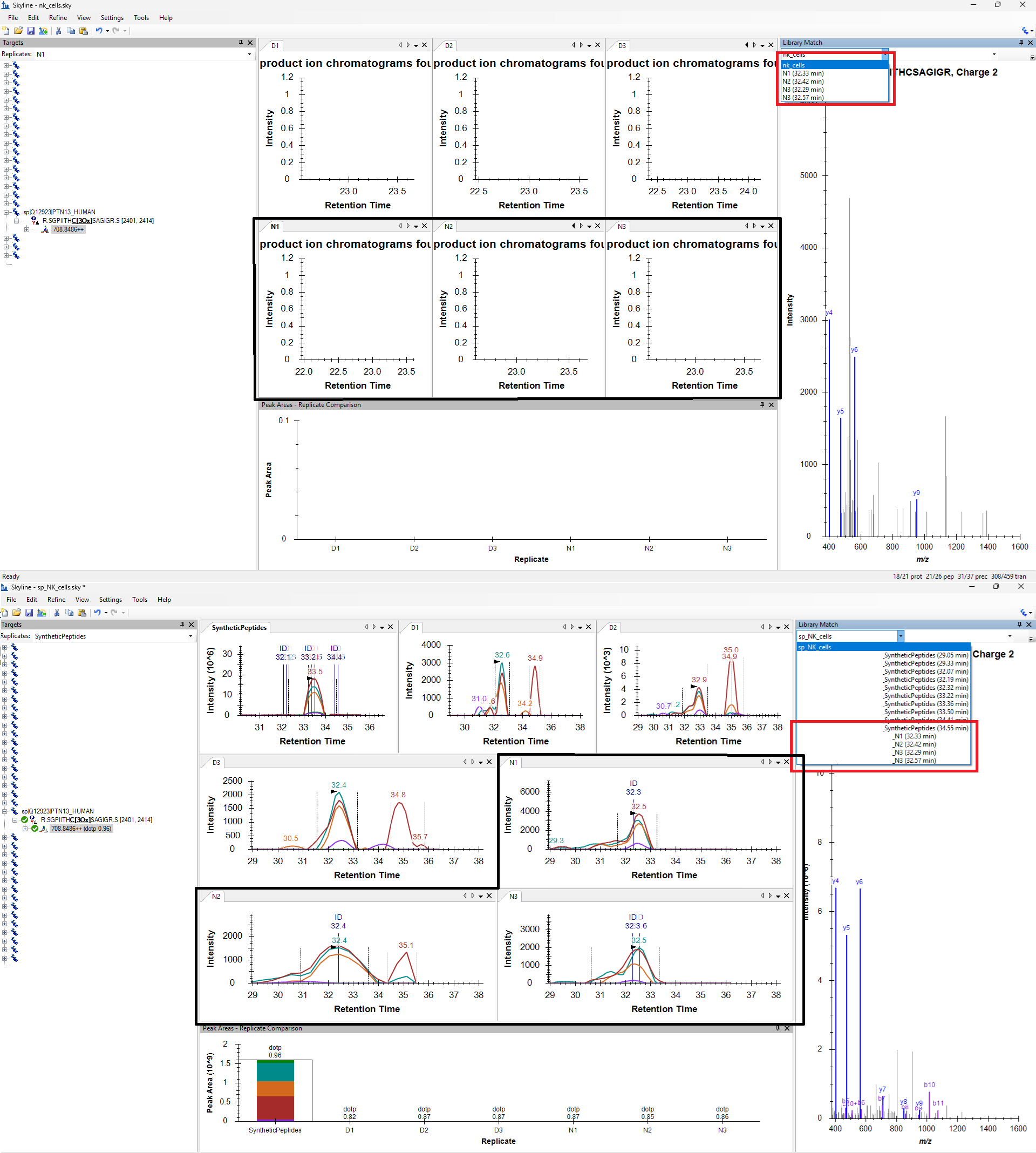
Here is where I encounter the issue: According to the MaxQuant results, 25 peptides are identified in the NK samples. However, in Skyline I can only see chromatograms for 18/25 peptides, even though MS/MS spectra for all peptides is present in the spectral library. One example is shown in the attached screenshot: PTN13 ms/ms in N1, N2, N3 samples, but to chromatogram (upper panel).
However, when I import msms.txt from the synthetic peptides first and then add the msms.txt from NK cells, Skyline does display chromatograms for all peptides (In N1, N2, N3 and even in D1, D2, D3 which do not have MS/MS).
My concern is that using synthetic peptide spectra in this way affects (and improves) the dotp values... Additionally, this approach causes Skyline to pick chromatograms (or apparent signal) in samples where these peptides are not detected at the MS/MS level (D1, D2, D3).
My question is: is there an alternative way to visualize or force chromatograms for these peptides using only the NK cell data, without relying on synthetic peptide MS/MS spectra?
Thank you very much for the help!
 
 
Nick Shulman responded:  2026-02-08 07:08
Can you send us your Skyline document?
In Skyline you can use the menu item:
File > Share
to create a .zip file containing your Skyline document and supporting files including extracted chromatograms.

Files which are less than 50MB can be attached to these support requests. You can always upload larger files here:
https://skyline.ms/files.url

I cannot tell what might be going on from your screenshot but after we see your Skyline document we will probably be able to give you a better answer.
-- Nick
 
eli responded:  2026-02-08 18:11
Hi Nick,

Thank you for your response.
I have attached the file. Please let me know if you need any additional files or information from my side.
The last 5 proteins in target panel, are the ones without chromatogram (+ PTPRM 1/2 peptides), so I had to add them after files were imported in.
I use (64-bit) 24.1.0.199 version.
-Elis
 
eli responded:  2026-02-08 18:15
Hi Nick,

Thank you for your response.
I have uploaded the file (nk_cells.sky). Please let me know if you need any additional files or information from my side.
The last 5 proteins in target panel, are the ones without chromatogram (+ PTPRM 1/2 peptides), so I had to add them after files were imported in.
I use (64-bit) 24.1.0.199 version.
-Elis
 
Nick Shulman responded:  2026-02-08 18:46
Thank you for uploading your Skyline document.

I think the problem might be that you added targets to your document after you had already extracted chromatograms.
If you add targets after you have extracted chromatograms, you have to tell Skyline to extract chromatograms again in order to see chromatograms for the newly added targets.
You can tell Skyline to extract chromatograms again using the "Reimport" button on the "Edit > Manage Results" dialog.

I see that you are using Skyline version 24.1.
The most recently released Skyline is 25.1. We always recommend using the latest version of Skyline unless you are trying to reproduce results from earlier experiments.

If "reimport" does not fix the problem for you then you should send us some of your .raw files so we can try to figure out what is going wrong.
-- Nick
 
eli responded:  2026-02-08 19:20
Hi Nick,
Thank you so much! After re-importing I can see the chromatograms!
As of newest version I tried to use one, but there was an error while I tried to import the raw files. So i decided to stick with the 24.1.
Again thank you very much!
-Elis