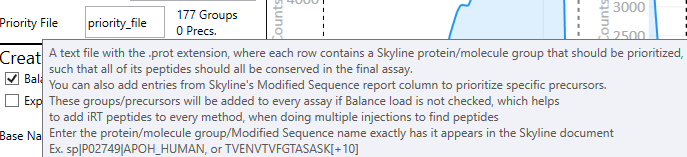
To use the Priority File feature, hover your mouse on the Priority File text and you'll get the tool tip shown in the attachment. Similar information is shown here on the quick reference page for PRM Conductor.
https://panoramaweb.org/Panorama%20Public/2025/Thermo%20Fisher%20Research%20and%20Development%20-%20PRM%20Conductor/wiki-page.view?name=tmo_tools_overview_prm_conductor
You'll either want to use the Protein name that Skyline has put into the Protein column if you go to the standard Protein report, or Molecule List name in small molecule mode. Or you can use the precursor name, found in the columns Modified Sequence Monoisotopic Masses or Molecule, for Proteomics or Small Molecule mode, respectively. You'll know if an item got found and prioritized because the UI will write how many Groups (proteins, molecule lists) or Precs. (Modified Sequence Monoisotopic Masses or Molecule) got found and prioritized. The count of Precs. is different depending on if you have Balanced Load checked or not. If it's checked, then Precs is >0 only if you included a precursor name in your file. If it's not checked, it looks like it will also include the count of precursors belonging to your prioritized proteins. That may be a little confusing actually, we could change that.
 priority_file_screenshot.png