Viewing MS1 and MS/MS data

support
Viewing MS1 and MS/MS data ibrahim abouseada  2026-03-13 14:29
 

Hi,
I am using a Xevo TQ with Masslynx V4.2 software. I am analyzing small molecules. I have MS1 data I'd like to view in skyline. I also have injections (containing 4 molecules of interest) where I set up 4 daughter scans/molecule.

Essentially I have injections that just have MS1 data, and injections that have anywhere from 4 to 16 daughter scans. How can I set up Skyline in the small molecule mode to view this data. Ideally I want to be able to extract for specific ions and integrate peaks of interest as well.

My data is in the .raw (waters format). I can convert to .mzML files as well if needed.

Thanks,
Ibrahim Abou-Seada


Nick Shulman responded:  2026-03-13 15:13
Usually people do SRM with a triple quadrupole instrument like the Xevo TQ.

It sounds like your mass spectrometer was run in scanning mode and has acquired what will look to Skyline to be ordinary MS1 and MS2 spectra.

I think what you have is a low resolution PRM experiment.
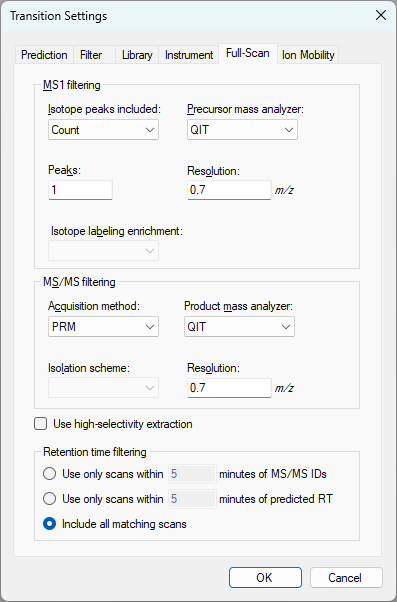
One of the things that you will have to do is go to the "Full Scan" tab at "Settings > Transition Settings" and make the settings look like the attached file. You should choose "QIT" for the precursor and product mass analyzers to tell Skyline that your instrument is low resolution and that Skyline should sum the signal across a wide m/z window when extracting chromatogram intensities.
Also, see that I have chosen "PRM" as the MS/MS filtering Acquisition Method. This means that the mass spectrometer was told to fragment particular precursor m/z's.

I would suggest that you do the "Small Molecule Targets" tutorial:
https://skyline.ms/wiki/home/software/Skyline/page.view?name=tutorial_small_molecule

The small molecule targets tutorial shows you how to add molecules to your document.
However, because your data are full scans instead of SRM chromatograms, before you do "File > Import > Results" you should go to the "Full Scan" tab at "Settings > Transition Settings" and change the settings so that they are like my attached screenshot.

If you get stuck, you should send us your files.
In Skyline you can use the menu item:
File > Share
to create a .zip file containing your Skyline document and supporting files including whatever chromatograms you have managed to extract.
You should also zip up and send us your Waters .raw folders.

Files which are less than 50MB can be attached to these support requests. You can always upload larger files here:
https://skyline.ms/files.url
-- Nick
 
ibrahim abouseada responded:  2026-03-14 10:28
Hi Nick,
I went through the tutorial and tried to follow your instructions and apply the settings you said. I am still getting the no chromatogram information available message. I've zipped up the skyline document and the .raw waters scans and attached them to this message.
 
Nick Shulman responded:  2026-03-14 11:25
Thank you for sending us those Waters .raw folders.

Unfortunately, all that Skyline is able to see in that data are MS2 spectra where 50 m/z is the precursor that was isolated.
It sounds like that is different from the actual data that was collected so it sounds like Skyline is misunderstanding your data.

You can tell Skyline to ignore what it thinks is the isolation window, and extract a chromatogram point from every spectrum.
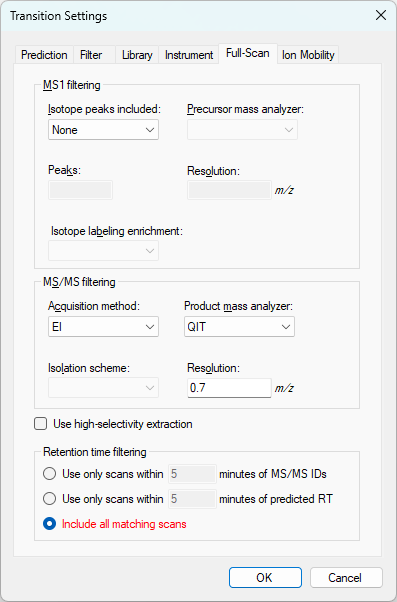
One way to do this is to choose "EI" as the MS/MS filtering acquisition method like in the attached screenshot.
After you change the Transition Settings you can tell Skyline to extract chromatograms again by using the "Reimport" button at "Edit > Manage Results".

I will ask my coworkers whether it is a bug that Skyline thinks all your spectra are MS2 with a 50 m/z isolation target.
-- Nick
 
Brian Pratt responded:  2026-03-19 08:04
The file definitely claims that every spectrum has that 50 m/z precursor isolation. But it seems this is not what's intended.

I'm curious to know if that number means anything in the context of the experiment? What does the data look like in the Waters software? Is there some other hint in the data that we should know about?

- Brian
 
ibrahim abouseada responded:  2026-03-19 10:20
Hi Brian,
My scans are MS1 or MS/MS scans where the range was from 50-1600 for the MS1 scans or 50-[precursor mass] for the MS/MS scans. I've attached an image of a sample chromatogram in the MassLynx software. I am not sure why it says MS2 in the upper right corner, as this was not an MS2 scan it was MS1.
 
Brian Pratt responded:  2026-03-19 12:47
>> or 50-[precursor mass] for the MS/MS scans

That's very helpful, thanks. I'll see what we can do to interpret that as intended.

The file only seems to record the MS/MS scans, for what it's worth, it does seem that we should be able to get precursor information.

Thanks,

Brian