Peak integration for all transitions

support
Peak integration for all transitions SChen  2026-01-26 10:01
 

Dear Skyline team,

I wonder if there is a way to automatically apply the same peak boundaries for all transitions after adding fragment ions.

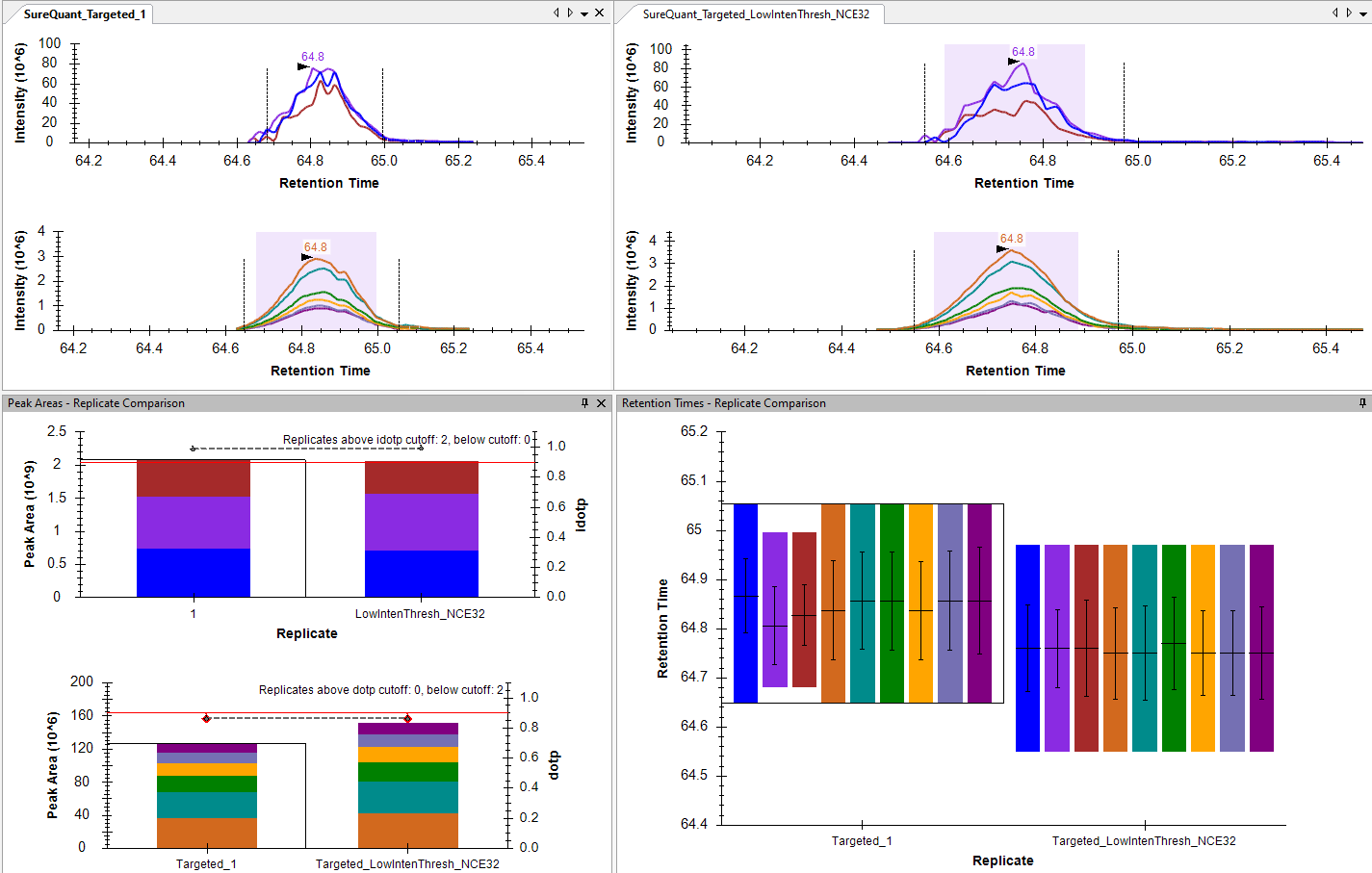
I believe Skyline tries to integrate the same peak boundaries for all transitions by default. However, I have noticed that when I add fragment ions and reimport raw data, the new fragment ions often have different peak boundaries from the other transitions in the same precursor (see the retention time panel in the attached screenshot). The peak boundaries will align if I manually adjust them. But I am curious if there is a way to do this automatically.

Also, when I made changes to the fragment ion and reimport raw data, the library dotp values didn't update automatically until I clicked Refine-Reintergrate.

Thank you,
Shimin


SChen responded:  2026-01-28 08:53

Adding a comment in case the request slipped through the cracks :)

 
Nick Shulman responded:  2026-01-28 10:27
There might be a way to get things the way that you want by exporting a report that has peak boundaries in it with one row per peptide. Then, after you reimport your results, you could use the "File > Import > Peak Boundaries" menu item to set the peak boundaries of the new transitions to what they were set to for the peptide.

I am not sure where the best documentation is for exactly what a peak boundaries file is supposed to look like.
If you have trouble getting this to work you could send us your Skyline document and one of your .raw files and we can figure out how to get the workaround to work.

In Skyline you can use the menu item:
File > Share
to create a .zip file containing your Skyline document and supporting files.
The Share Document dialog gives you the option of including the raw files in the zip file or you could send them to us separately.

Files which are less than 50MB can be attached to these support requests. You can always upload larger files here:
https://skyline.ms/files.url

I think what is happening is that when you reimport, Skyline does have any peak boundaries for the newly added transitions, so it just sets them to the peak boundaries of the best-scoring detected peak. You would rather that Skyline used the peak boundaries of all the other transitions under the same Precursor.
-- Nick
 
SChen responded:  2026-01-28 11:24
Nick,

Thank you for your response. I have tried importing peak boundaries to a different document before so I should be ok.

Your explanation makes sense. Since I have manually adjusted the peak boundaries, the newly added transitions have boundaries closer to the original peak picked by Skyline. I was just a bit surprised that Skyline doesn't enforce consistent peak boundaries in this case, but the workaround is simple enough.

Thank you,
Shimin
 
Juan C. Rojas E. responded:  2026-01-29 10:32
Hi,

I have also observed the same behavior, also for cases of peptides with multiple precursors.

Although the import peak boundaries option works, would there be a way to make Skyline to check if any of that transitions have been manually edited and enforce those boundaries for all transitions of its molecule? If no manual edits present, then let the best peak to be select and enforce that for all transitions?

Sincerely,
Juan C.