Hi,
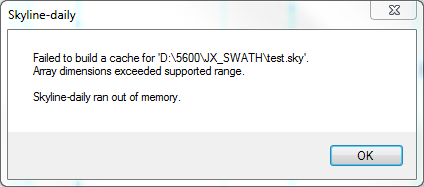
I am experiencing the following error: "failed to build cache: 'file location and name'." Array dimensions exceeded supported range. Skyline ran out of memory.
I have seen this with latest version of Skyline and Skyline-Daily. The system is 64-bit Win7 with 64 GB RAM. Skyline is using about 12 GB when the error occurs.
I think the problem is I have too many transitions in my document, ~700,000. If I drop this to ~300,000 the file loads as expected. I know this is a lot, I am trying to analyse some SWATH data. The resulting file has around 940 proteins that expands to ~22,000 peptides, ~45,000 precursors and finally ~700,000 transitions.
What are limits imposed on Skyline here? Personally, I don't think 940 proteins is that much. We can easily see thousands in a run. The problems arise when you start going to peptide, precursors etc. My logic is to try and load as much data up front and then filter out the rubbish. If this means 10-20 peptides per protein, then so be it. I'd prefer not to pick 5 peptides per protein (for eg.) upfront so that the numbers don't get too daunting for Skyline to handle. This in itself would be quite a task. As it is, I am only loading peptides that are found in my library.
Can someone suggest a way around this?
Thanks,
Peter |
| |
| Brendan MacLean responded: |
2015-02-25 19:55 |
Hi Peter,
The solution is relatively straightforward. Most people who have run into this have simply split their targets into multiple Skyline documents. As you narrow your field, you should be able to return to a single document (using File > Import > Document to merge reduced documents). I guess I don't see this as a great hardship. So far I have had difficulty actually getting a document and data file to reproduce this case, because they tend to be so big.
I hope this is an acceptable solution to allow you to filter out the rubbish. Maybe start with 200 proteins at a time and stay well away from the limit you are seeing.
Thanks for posting your feedback, and for using Skyline in your research.
--Brendan |
| |
| phains responded: |
2015-02-25 20:20 |
Hi Brendan,
thanks for the reply, it's nice to know I was on the right track.
Dare I suggest that longer term there will be a need to deal with this? As I am sure you know, proteomics datasets are only going to get larger as time goes by. They are already pretty damned big. I want to be able to process all my data as one Skyline file. I can see that I can run all the proteins through Skyline, in numerous files, and then pool them once I export the peak areas. Personally, I do see this as a bit of a pain. I'll need to make sure I have the correct iRT peptides in each file and remove them at a later stage. I then have the added complication of numerous files to track and manage. Finally, I have to pool the peak area data and hope I don't miss some or do something else stupid in the process.
In my case, I am looking to see what proteins change in response to treatment type, age or whatever. I really don't know what is going to change, so I do actually want to look at everything. Additionally, I like to have a lot of extra proteins that aren't changing, so I can use these for normalisation of the dataset and find out what is really changing.
I want to assure you I think Skyline is brilliant, I just was to provide feedback as to how I'd like to continue to use it for this type of work. One of Skyline's great strengths is it's flexibility.
Thanks again,
Peter |
| |
| Brendan MacLean responded: |
2015-02-25 21:10 |
Hi Peter,
Thanks for the feedback. I assure you we take continuing to expand the capabilities of Skyline very seriously, and we don't consider this an acceptable long-term solution. However, we do have a pretty big list of things to prioritize, and I sometimes wonder if we have already been over-prioritizing these larger scale techniques over well defined targeted clinical quantification data sets.
We do our best to keep advancing in a number of important directions. I certainly wish Skyline were already flexible enough to meet your most heartfelt desires, but that may still take a lot of work and some time. I hope you will be able to make do with what Skyline has to offer until then.
--Brendan |
| |
| phains responded: |
2015-04-28 16:37 |
Hi again,
I am using Skyline-Daily 3.1.1.7383 and I am seeing this identical problem again. I was able to get around the issue with an earlier version of Skyline-Daily by reducing the number of proteins/peptides/precursors/transitions to 285/6546/9541/56808, respectively.
I have since gone back to that file, added 2 proteins and the error has raised it's ugly head again. I've tried deleting other proteins to get the numbers down, but the problem persists. I went back to the original file, deleted the data and tried loading a result file. The error occurs.
If I move the proteins etc to Skyline 3.1.0.7382 and try loading a result file, it works as expected. It's weird the problem is in Daily and not the released version, I usually find the opposite.
Thanks,
Peter |
| |
| Nick Shulman responded: |
2015-04-28 17:08 |
That Skyline-Daily version is definitely supposed to have the fix in it.
You should not be seeing the "Array dimensions exceeded supported range" error.
Are you perhaps seeing a slightly different error message? |
| |
| phains responded: |
2015-04-28 17:24 |
Screen capture attached, it's the same error. I'm in the process of getting the file ready for sharing.
Peter |
|
| |
| phains responded: |
2015-04-29 19:17 |
Files just finished uploading, sorry about the delay...
Peter |
| |
| Nick Shulman responded: |
2015-04-30 23:37 |
Thanks for sending the files. I had no trouble importing them using my copy of Skyline-Daily.
I wonder if it is possible that Windows is lying to you about which version of Skyline-Daily you have installed. I would recommend using Control Panel to uninstall Skyline-Daily and then install it again from the web site.
In an upcoming release of Skyline-Daily, we will make it so that the error message that you see has a lot more detail. If you can wait until then, it will be much easier to diagnose this problem. |
| |
| phains responded: |
2015-05-11 20:15 |
Hi again,
I've just downloaded the new version of Skyline-Daily. The installed version is reported as 3.1.1.7469 (64-bit). For the record, I did try uninstalling Daily and reinstalling (prior to this release) and got the same error message.
I get the same error message with the most recent version. I hit the 'More info' button and I've pasted the message below. I tried a few different files and the specifics of the message are the same.
Thanks again,
Peter
System.Exception: Failed to build a cache for 'D:\5600\JX_SWATH\Daily_test.sky'.
Array dimensions exceeded supported range. ---> System.OutOfMemoryException: Array dimensions exceeded supported range.
at pwiz.Skyline.Model.Results.ChromCollector.Allocator.AllocateBuffer(ChromCollector collector) in c:\proj\pwiz_x64\pwiz_tools\Skyline\Model\Results\ChromCollector.cs:line 368
at pwiz.Skyline.Model.Results.ChromDataCollectorSet..ctor(ChromSource chromSource, TimeSharing timeSharing, TransitionData allChromData) in c:\proj\pwiz_x64\pwiz_tools\Skyline\Model\Results\SpectraChromDataProvider.cs:line 607
at pwiz.Skyline.Model.Results.SpectraChromDataProvider..ctor(MsDataFileImpl dataFile, ChromFileInfo fileInfo, SrmDocument document, String cachePath, ProgressStatus status, Int32 startPercent, Int32 endPercent, IProgressMonitor loader) in c:\proj\pwiz_x64\pwiz_tools\Skyline\Model\Results\SpectraChromDataProvider.cs:line 235
at pwiz.Skyline.Model.Results.ChromCacheBuilder.CreateSpectraChromProvider(MsDataFileImpl dataFile, ChromFileInfo fileInfo) in c:\proj\pwiz_x64\pwiz_tools\Skyline\Model\Results\ChromCacheBuilder.cs:line 1093
at pwiz.Skyline.Model.Results.ChromCacheBuilder.BuildNextFileInner() in c:\proj\pwiz_x64\pwiz_tools\Skyline\Model\Results\ChromCacheBuilder.cs:line 309
--- End of inner exception stack trace --- |
| |
| Nick Shulman responded: |
2015-05-11 22:20 |
Thanks. This helps a lot.
This is a different problem than the one that you were running into in February.
In Skyline-Daily we made some changes so that Skyline would better take advantage of the available memory on your computer without having to write to temporary files.
How much RAM is in your computer? This might actually be the sort of bug that ironically only occurs if you have too much RAM. |
| |
| Nick Shulman responded: |
2015-05-12 16:13 |
It looks like we made a mistake in our math, and if you have _more_ than 32GB RAM in your computer, Skyline tries to ask for too much memory at once, and you hit this error.
We will fix this in the next update of Skyline-Daily. |
| |
|
|
 error.PNG