| Brendan MacLean responded: |
2011-09-21 17:13 |
|
| |
| Brett Phinney responded: |
2011-09-21 17:41 |
Thanks Brendan! I knew about the results grid but not the custom annotation. So for the custom annotation I see you can apply it to things like the proteins, or peptides, transitions etc. Is there anyway to apply this on the replicate level? For example if I wanted to add a column size or treatment condition column.
Thanks!
Brett |
| |
| Brendan MacLean responded: |
2011-09-22 11:32 |
Hi Brett,
Ah, yes, the current situation for this is less than ideal. Others have requested document level notes and annotations. There is a work-around for that, but it doesn't quite work for document-level per-replicate notes, since the per-replicate annotations are only available on precursors and transitions.
So, here is what I suggest trying until we can further expand the annotation capabilities of Skyline.
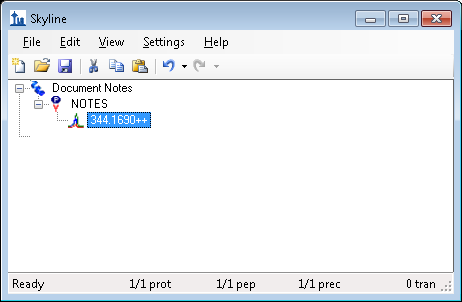
- On the Edit menu, choose Insert and click Peptides
- Enter the peptide NOTES with protein name Document Notes.
- In the document, delete any transitions under the precursor for this dummy peptide (see attached image).
When you select the precursor item for this peptide, you should be able to set per-replicate notes on it, without any effect on your experimental method.
Yes, it is a hack, but hopefully one that will suffice for a while.
Let me know if you encounter any problems with this idea.
Thanks for your post to the support board.
--Brendan |
|
| |
| Brett Phinney responded: |
2011-09-22 11:39 |
Thanks Brendan, I think what I am really in need of is document level per-replicate notes as I like to keep track of variables associated with my individual QC's like column and other QC metrics that I get from other programs outside of skyline. I assume there is not a hack for that unfortunately. I'll give this some thought...Maybe I'll come up with a hack or two. Thanks!!
Brett |
| |
| Brendan MacLean responded: |
2011-09-22 12:26 |
Hi Brett,
Review carefully. The work-around described was intended to provide document-wide per-replicate notes. You just use the Results Grid to set notes on the dummy precursor.
Good luck!
--Brendan |
| |
| Brett Phinney responded: |
2011-09-22 13:41 |
Hi Brendan, Ok I think I'm getting closer. So I did what you suggested and then added a custom annotation and select precursor level. I go to the results grid panel and when I have that precursor highlighted (I used the 344 one)and the I select "choose columns". When I do that I do not see the custom annotations in the results grid.... I'll keep trying, I probably just need more coffee!
Thanks! |
| |
| Brendan MacLean responded: |
2011-09-22 13:54 |
Hi Brett,
You want to use "Precursor Results" and not "Precursor". The former is per-replicate, and should appear in the Results Grid, while the latter is per-precursor, and will only show up when you select the precursor and choose Edit / Note.
--Brendan |
| |
| Brett Phinney responded: |
2011-09-22 14:00 |
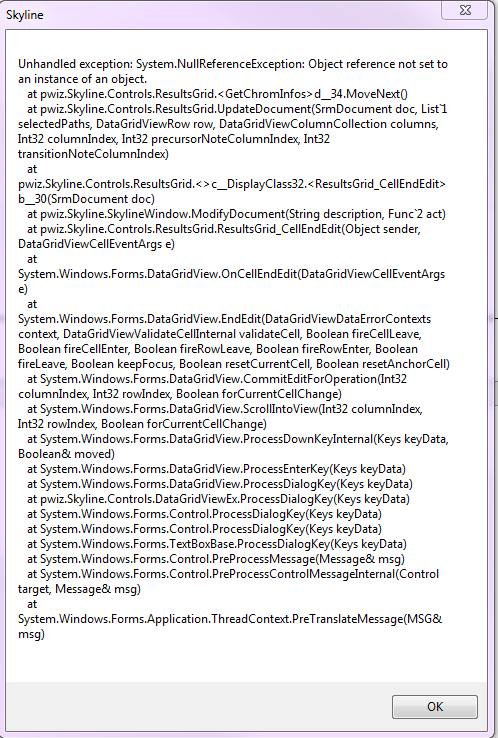
Got it. Ok I gave that a whirl. I noticed that when I put something in my custom annotation column and do not hit "enter" it will disappear if I move to a different peptide. If I hit enter I get this error message
Thanks! |
|
| |
| Brendan MacLean responded: |
2011-09-22 14:06 |
Hi Brett,
Hmmm... Yes, that particular error is fixed in current builds of the version that will be 1.2.
Let me think about whether to port the fix back to 1.1 for a 1.1 update or move you to development builds until 1.2 is released.
--Brendan |
| |
 Document Notes.png
 skyline error sep 2011.png